
Architecture#
GuPPy is organized into seven packages under src/guppy/, each owning one concern. Reading raw
acquisition files, computing a z-score, drawing a trace, and deciding what happens when you click
Preprocess are four separate jobs, and they live in four separate places. Once you know which
package owns the thing you want to change, you usually only need to read one of them.
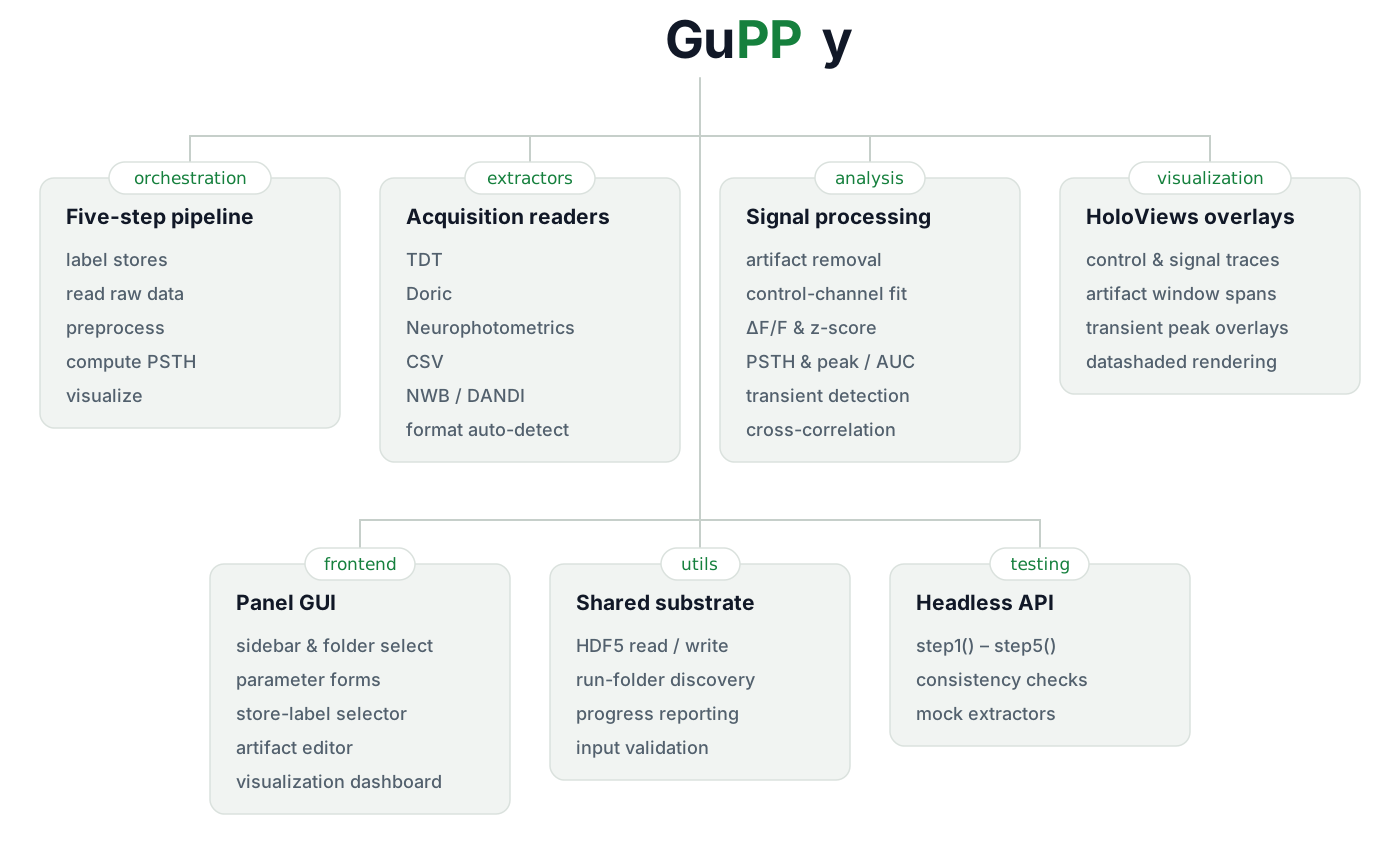
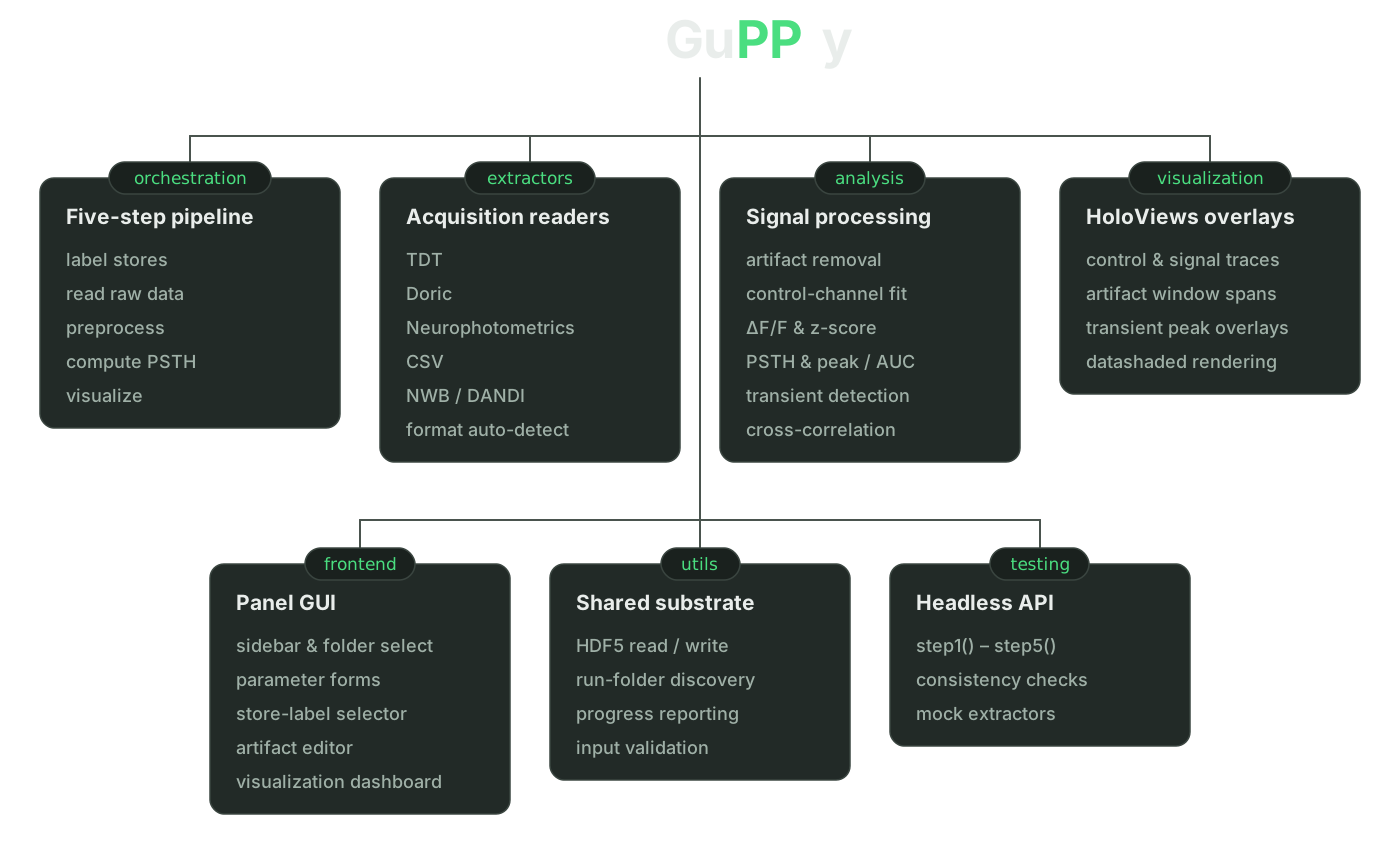
Dependencies run one way. frontend and orchestration sit at the top and call down into
extractors, analysis, and visualization, which never call back up. utils sits underneath
everything. Nothing in analysis knows that a GUI exists.
The packages#
orchestration/#
Coordinates the pipeline. One module per step, each exposing a worker function that takes a single
inputParameters dictionary — the same dictionary that gets snapshotted to
GuPPyParamtersUsed.json in every output folder.
home.py is the
entry point: build_homepage() assembles the Panel template, collects parameters from the form, and
wires each sidebar button to its worker. It also exposes template._hooks and template._widgets,
which is how the test suite drives the app without a browser.
Orchestration is also where pre-execution validation belongs — the checks that depend on several parameters at once, or on what is already on disk (store-labeling consistency, peak-window ordering, whether step 4 actually produced the metric you asked to plot). Running them upfront in the worker means a user sees the error before a progress bar starts moving.
extractors/#
Reads raw acquisition data. Every reader subclasses BaseRecordingExtractor and implements the same
five required methods — discover_events_and_flags(), read(), save(), count_samples(), and
stub() — so the rest of the codebase never branches on acquisition format.
Supported formats: TdtRecordingExtractor, DoricRecordingExtractor, NpmRecordingExtractor,
PyPhotometryRecordingExtractor, CsvRecordingExtractor, NwbRecordingExtractor, and
DandiNwbRecordingExtractor for streaming straight from the DANDI Archive.
A session folder does not have to be a single format. detect_acquisition_formats() reports every
format present, and
read_raw_data.py
maps each event to the extractor that owns it, then issues one batched read() per extractor — which
is how a TDT recording with TTLs in a sidecar CSV works.
analysis/#
The signal processing itself: timestamp correction, control-channel fitting, ΔF/F and z-score, artifact removal, PSTH computation, peak and AUC metrics, cross-correlation, transient detection, and group averaging.
These are plain functions over NumPy arrays. They take data and parameters, return data, and know nothing about Panel, progress bars, or which step invoked them. Validation here is limited to the checks that need a loaded signal — for example, that a baseline window falls inside the recording’s timespan. If you are adding a new computation, this is where the maths goes.
standard_io.py and io_utils.py sit alongside them and know the pipeline’s on-disk conventions:
which HDF5 file a corrected trace lives in, how channel paths map to recording sites.
visualization/#
HoloViews overlays for the interactive views: the control/signal/fitted-control traces, the shaded
spans that mark artifact windows, and the detected-peak overlays. These are builder functions that
return HoloViews objects; the page they land on is assembled in frontend/.
shading.py handles display-time rendering. shade_trace wraps a curve in a datashader aggregation
so a multi-million-sample trace stays server-side and re-renders on zoom, which is what keeps
full-length recordings plottable.
frontend/#
The Panel widget components: the sidebar, the folder and run selectors, the parameter form, the store-label configuration page, the artifact-window editor, the three DANDI panels (see How the DANDI browser works), and the visualization dashboard. Each is a class that builds its own widgets and exposes their values.
Validation at this layer covers only what the form can judge by itself — a required folder that was not selected, a missing DANDI URI. Anything needing cross-parameter context belongs in orchestration instead.
The folder and run selectors start in the user’s home directory. Choosing an input root folder re-points the session selector into it, which is how the testing API and the screenshot scripts land the pickers on their own data.
utils/#
The shared substrate. _hdf5_io.py holds the low-level HDF5 read and write primitives; utils.py
handles run-folder discovery and naming; progress.py provides the step progress reporter and the
@step_error_handler decorator that surfaces a failed step in the GUI; validation.py holds the
validation helpers reused across layers (validate_window_bounds, validate_peak_windows,
validate_required_folder_selection, and friends).
Three DANDI modules sit here too, as the archive-side counterpart to the DANDI extractor, forming
a pipeline in which each imports only the one before it. dandi_search.py reports what the archive
says about dandisets and their assets; dandi_filter.py reads those assets’ bytes to decide which
of them, and which whole dandisets, hold photometry GuPPy can read; dandi_preview.py opens one
asset and reports what it holds in detail. The split is forced by the archive: DANDI’s structured
metadata carries no notion of fiber photometry, so the search can only propose candidates and
anything authoritative has to be read out of the files. See DANDI browser
for the reading strategy that makes that affordable.
testing/#
The harness the test suite uses to run the pipeline without a browser.
api.py exposes step1()
through step5() plus save_parameters_snapshot() and import_custom_events(), each keyword-only.
They mirror the production call chain — build the page context, collect input parameters, call the
worker — so a test exercises the same code path a click does. Alongside them, consistency.py
handles regression comparisons and mock_recording_extractor.py provides a reader for tests that
have no real recording.
The package root#
Three modules sit directly under src/guppy/: main.py (the guppy console entry point),
app.py (serves the Panel application), and logging_config.py (log setup, including the
guppy --export-logs bundle).
Where each step lives#
Step |
Module |
Worker |
|---|---|---|
1 — Label Stores |
|
|
2 — Read Raw Data |
|
|
3 — Preprocess |
|
|
4 — PSTH Computation |
|
|
5 — Visualization |
|
|
optional — Import Custom Events |
|
|
optional — Select Artifact Windows |
|
|
optional — Remove Artifacts |
|
|
optional — Tonic Analysis |
|
|
optional — Label Groups |
|
|
optional — Group Analysis |
|
|
Saving the parameters is not a step of its own. orchestration/save_parameters.py is called by each
worker, so GuPPyParamtersUsed.json in an output folder always reflects the configuration that
produced it.
Adding a new acquisition format#
The most common extension is a new reader. See Adding a new acquisition format for the full extractor contract and the end-to-end registration checklist.