
Custom Plots from GuPPy Outputs#
The Visualization GUI covers the plots most analyses need, but sooner or later you will want a figure it does not offer: your own color scheme for a paper, two recording sites overlaid, a subset of trials, a statistic GuPPy does not compute. Everything you need for that is already on disk in the run folder, and this tutorial opens it.
This is the sequel to Your First Analysis. It uses the run folder that tutorial produces and builds three figures from it with plain matplotlib.
By the end you will have:
Read a run folder’s
storesList.csvto find out what is in itLoaded the whole-session z-scored trace and marked the events on it
Loaded the PSTH table and plotted the trial mean with its error band
Turned the same table into a trial heat map
Read the peak and area-under-curve numbers behind those plots
Prerequisites#
A completed run. Work through Your First Analysis first. It leaves you with
guppy_output/sample_data_csv_1/output_1/, the run folder every example below reads. If you named your run something else, or ran the pipeline a second time, adjust the path.No extra installation.
h5py,pandas,numpyandmatplotlibare all GuPPy dependencies, so a working GuPPy environment already has them. Run the code from a Python session, a script, or a notebook — whatever you normally use.
Every example starts from the run folder:
from pathlib import Path

run_folder = Path("guppy_output/sample_data_csv_1/output_1")
The two HDF5 extensions#
GuPPy writes two kinds of HDF5 file, and they are not interchangeable:
Extension |
Written by |
Read with |
Holds |
|---|---|---|---|
|
h5py |
|
Named arrays — one file per store or per recording site |
|
|
|
Exactly one table, always under the key |
Signals and timestamps are .hdf5. Tables — the PSTH, peak/AUC, transients, cross-correlation — are .h5.
An .hdf5 file is a bag of named arrays. Ask it for the one you want:
import h5py

with h5py.File(run_folder / "z_score_A.hdf5", "r") as z_score_file:
    print(list(z_score_file.keys()))
    z_score = z_score_file["data"][:]
['data']
The values live in datasets, not in HDF5 attributes — GuPPy never sets an attribute anywhere, so sampling_rate and friends are arrays you read like any other.
A .h5 file is one pandas table:
import pandas as pd

psth = pd.read_hdf(run_folder / "RewardPort_A_z_score_A.h5", key="df")
Both extensions are HDF5; what differs is who wrote the file. GuPPy writes .hdf5 with h5py, so every dataset sits under the name GuPPy gave it. It writes .h5 with DataFrame.to_hdf, which stores the frame the way pandas holds it in memory — columns grouped by dtype into blocks, with the labels kept alongside as separate arrays. Open one with h5py and you see that decomposition:
with h5py.File(run_folder / "RewardPort_A_z_score_A.h5", "r") as psth_file:
    print(list(psth_file["df"].keys()))
['axis0', 'axis1', 'block0_items', 'block0_values']
axis0 is the column labels, axis1 the row index, and block0_values the numbers. The table is all there, just taken apart; pandas.read_hdf is what puts it back together, which is why it is the reader to use.
If you do read a .h5 without pandas, mind the blocks. A table whose columns are not all one dtype is split across block0_values, block1_values and so on, and that grouping does not follow the column order in axis0. Pairing the two up positionally silently mislabels columns — match axis0 against each block’s own block<N>_items instead.
The Output data model reference lists which files are which.
What is in the run folder#
storesList.csv is the run’s index: a headerless two-row table where row 0 holds the raw channel names from your acquisition files and row 1 holds the labels you assigned in Step 1.
stores = pd.read_csv(run_folder / "storesList.csv", header=None)
store_id_to_store_label = dict(zip(stores.iloc[0], stores.iloc[1]))
print(store_id_to_store_label)
{'Sample_Control_Channel': 'control_A', 'Sample_Signal_Channel': 'signal_A', 'Sample_TTL': 'RewardPort'}
Reading this instead of hardcoding the names is what lets a script run over sessions you have not looked at yet. The recording sites — the A in signal_A — are what the preprocessed filenames are built from:
recording_sites = sorted(
    label.removeprefix("signal_") for label in store_id_to_store_label.values() if label.startswith("signal_")
)
Strip the signal_ prefix rather than splitting on the last underscore. A site may itself contain an underscore (signal_left_hemisphere), and splitting would hand you hemisphere.
Plot 1: the whole session#
The z-scored trace and the time axis it belongs on live in two different files. z_score_A.hdf5 holds the values under data, and timeCorrection_A.hdf5 holds the timebase under timestampNew — the corrected timestamps every trace at that site shares, in seconds of session time. Event times come from RewardPort_A.hdf5, under ts, already on that same timebase.
import matplotlib.pyplot as plt

with h5py.File(run_folder / "timeCorrection_A.hdf5", "r") as time_correction_file:
    timestamps = time_correction_file["timestampNew"][:]
    sampling_rate = time_correction_file["sampling_rate"][0]

with h5py.File(run_folder / "z_score_A.hdf5", "r") as z_score_file:
    z_score = z_score_file["data"][:]

with h5py.File(run_folder / "RewardPort_A.hdf5", "r") as event_file:
    event_times = event_file["ts"][:]

figure, axes = plt.subplots(figsize=(7.5, 2.8), constrained_layout=True)
axes.plot(timestamps, z_score, color="#1f4e79", linewidth=0.5)
for event_time in event_times:
    axes.axvline(event_time, color="#2c7a3a", linewidth=1.0, linestyle="--")
axes.set_xlabel("Time (s)")
axes.set_ylabel("z-score")
axes.set_title(f"Recording site A — {sampling_rate:.1f} Hz, {len(event_times)} RewardPort events")
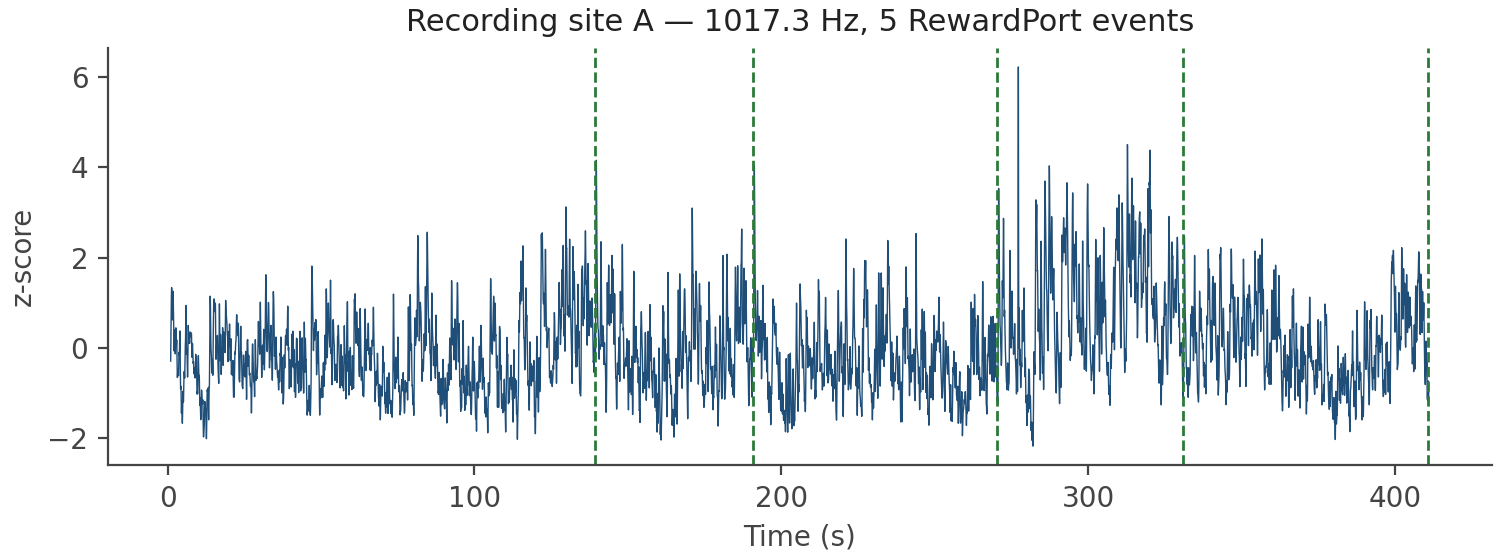
Swap z_score_A.hdf5 for dff_A.hdf5 and you get the ΔF/F on the same axis; both are keyed data. signal_A.hdf5 and control_A.hdf5 hold the filtered raw channels, also under data, and also on timestampNew.
Plot 2: the PSTH#
RewardPort_A_z_score_A.h5 is the peri-event table. The name reads as event RewardPort, recording site A, computed on the trace z_score_A — the site appears twice because the metric name already ends in it.
psth = pd.read_hdf(run_folder / "RewardPort_A_z_score_A.h5", key="df")
print(psth.shape)
print(list(psth.columns))
(30519, 8)
['139.238440990448', '190.68911623954773', '270.35009026527405', '330.88094210624695', '410.86189556121826', 'timestamps', 'mean', 'err']
One row per time point. The columns are:
Column |
Meaning |
|---|---|
One per trial |
That trial’s extracted window. The column label is the event’s session timestamp, as a string |
|
Present only when trial binning is on: one pair per bin |
|
Time relative to the event, from |
|
The average across the single-trial columns, and its standard error |
Select the trial columns by exclusion rather than by position, so binning or a different trial count does not break the code:
summary_columns = {"timestamps", "mean", "err"}
trial_columns = [
    column for column in psth.columns if column not in summary_columns and not column.startswith("bin_")
]
Then the figure is ordinary matplotlib:
figure, axes = plt.subplots(figsize=(6.0, 3.4), constrained_layout=True)
for index, column in enumerate(trial_columns):
    axes.plot(
        psth["timestamps"],
        psth[column],
        color="#a8a8a8",
        linewidth=0.7,
        label="single trials" if index == 0 else None,
    )
axes.fill_between(
    psth["timestamps"],
    psth["mean"] - psth["err"],
    psth["mean"] + psth["err"],
    color="#c0392b",
    alpha=0.25,
    linewidth=0,
    label="SEM",
)
axes.plot(psth["timestamps"], psth["mean"], color="#c0392b", linewidth=1.8, label="mean")
axes.axvline(0.0, color="#2c7a3a", linewidth=1.0, linestyle="--")
axes.set_xlabel("Time from RewardPort (s)")
axes.set_ylabel("z-score")
axes.legend(frameon=False, fontsize=9)
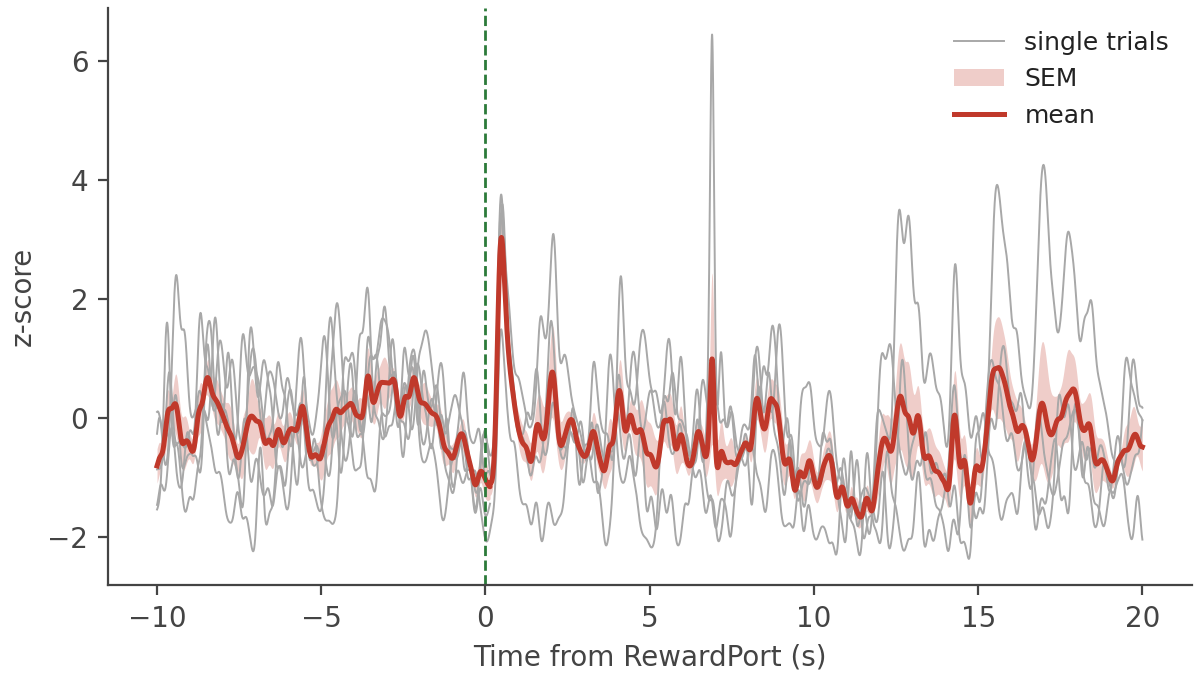
The sample session has five TTL timestamps, so this average is over five trials and is correspondingly noisy. That is the minimal example dataset, not your data.
RewardPort_A_baselineUncorrected_z_score_A.h5 is the same table before the baseline correction was subtracted, with the same columns, if you want to see what the correction did.
Plot 3: the trial heat map#
The trial columns are already a trials × time matrix once you transpose them:
import numpy as np

trials = psth[trial_columns].to_numpy().T

figure, axes = plt.subplots(figsize=(6.0, 2.8), constrained_layout=True)
image = axes.imshow(
    trials,
    aspect="auto",
    interpolation="nearest",
    cmap="plasma",
    extent=(psth["timestamps"].iloc[0], psth["timestamps"].iloc[-1], len(trial_columns) + 0.5, 0.5),
)
axes.axvline(0.0, color="white", linewidth=1.0, linestyle="--")
axes.set_yticks(np.arange(len(trial_columns)) + 1)
axes.set_xlabel("Time from RewardPort (s)")
axes.set_ylabel("Trial")
figure.colorbar(image, ax=axes, label="z-score")
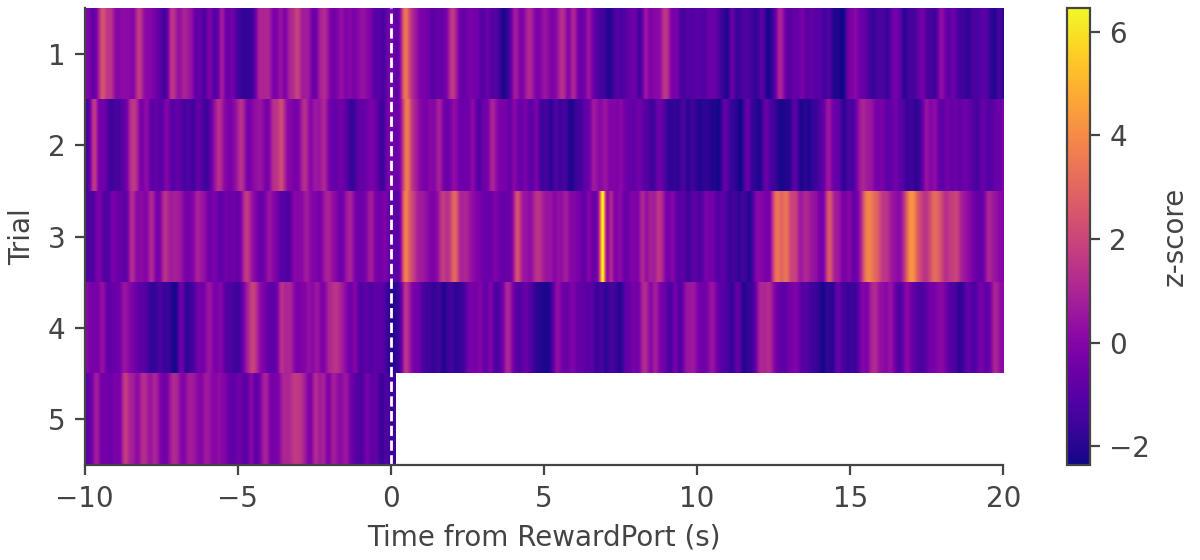
Trial 5 goes blank after time zero. Its event fires at 410.9 s in a recording that ends around 411 s, so most of its 20-second post-event window falls off the end and is filled with NaN. Nothing has gone wrong: mean and err skip NaN samples, so that trial still contributes the part of its window that exists.
The numbers behind the plots#
Step 4 also writes the peak and area-under-curve measurements, as a CSV and as an identical .h5:
peak_and_area = pd.read_csv(run_folder / "peak_AUC_RewardPort_A_z_score_A.csv", index_col=0)
print(peak_and_area)
                                      peak_pos_1  peak_neg_1    area_1  peak_pos_2  peak_neg_2      area_2  peak_pos_3  peak_neg_3     area_3
sample_data_csv_1_139.238440990448      1.878247   -1.776373  0.826477    3.439604   -1.079746   295.32306    1.579432   -2.068158 -1850.9402
sample_data_csv_1_190.68911623954773    2.196041   -1.716294 -0.333130    3.600455   -1.119725   615.05420    0.646500   -2.136859 -4916.6577
sample_data_csv_1_270.35009026527405    1.697248   -1.233404  0.821472    3.760017   -1.012888  2860.40200    6.448158   -1.488015   952.9874
sample_data_csv_1_330.88094210624695    1.935269   -2.041042  1.784668    1.495362   -2.072306 -2953.94290    1.203289   -2.171657 -3106.9985
sample_data_csv_1_410.86189556121826    1.680677   -1.634127  1.052612         NaN         NaN         NaN         NaN         NaN        NaN
sample_data_csv_1_mean                  0.711019   -1.118595  0.830322    3.038777   -1.151094   187.74446    0.997421   -1.210162 -2230.4023
One row per trial plus a final mean row, matching the PSTH’s columns, indexed by the session name joined to the trial label. peak_pos_<N>, peak_neg_<N> and area_<N> are the measurements for the Nth peak window you configured — three by default, -5 to 0, 0 to 3 and 5 to 10 seconds. Trial 5’s later windows are NaN for the same reason its heat map row is blank.
The areas look large next to the peaks because the default AUC Units setting integrates with one-sample spacing, so the number scales with the sampling rate. Set it to seconds for z-score × seconds.
Gotchas#
.hdf5opens with h5py,.h5withpandas.read_hdf. A.h5read with h5py does not raise — you get the table decomposed into pandas’ storage blocks rather than its columns.Use the Step 3 files, not the Step 2 ones. A run folder holds two sets:
Sample_Signal_Channel.hdf5, named after the raw channel, holds the untrimmed data straight from the acquisition file, and on TDT recordings itsdataandtimestampsare not even the same length.signal_A.hdf5, named after the label you assigned, holds the trimmed and filtered version that everything downstream is aligned to.timestampsmeans three different things. Session time in an.hdf5, time relative to the event in a PSTH.h5, and lag in seconds in a cross-correlation.h5.The sampling rate lives in
timeCorrection_<site>.hdf5. It is not an HDF5 attribute and it is not in the tables.Trial column labels are strings.
psth["139.238440990448"]works;psth[139.238440990448]does not.Expect NaN. Trials that run off the end of the recording, and any period you removed with the
replace with NaNartifact method, are NaN. Usenumpy.nanmeanand friends.
Next steps#
The Output data model reference documents every remaining file: the transient detections, the cross-correlation tables, and group directories, which have the same shape as a run folder with one column per member run instead of one per trial.
See How-to Guides for the optional steps that add to a run folder.