
Measure tonic signal levels across a session#
Some experiments ask what the signal level is during each phase of a session rather than how it responds to an event — a drug injected partway through, an optogenetic manipulation held for minutes, a state change scored from behavior. This guide shows how to name those phases and get the mean z-score and ΔF/F of each.
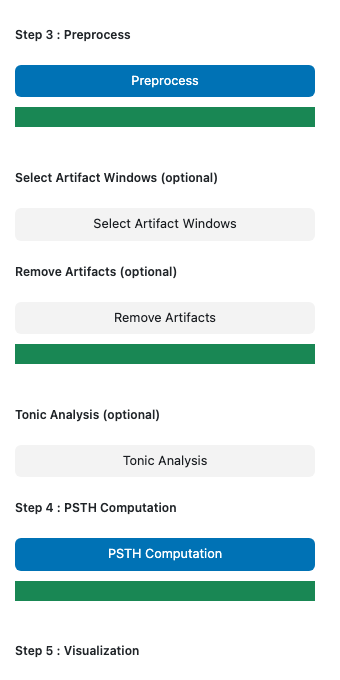
One optional step handles this, and it sits between Remove Artifacts and Step 4: PSTH Computation in the sidebar:
Tonic Analysis — name the epoch windows and average the traces over them.
If your question is event-triggered, skip it. PSTH computation is unaffected, and nothing downstream requires it.
Before you start#
Tonic analysis averages the traces Step 3 produces, so run the pipeline up to that point first:
Run Step 1: Label Stores and Step 2: Read Raw Data on the sessions you want to measure.
If the signal steps partway through — a drug injection, say — set Control Fit Window to
baseline epochand give it a window from before the change. A full-trace fit treats the step as part of the control-to-signal relationship and absorbs most of it, leaving little for the epoch means to measure. See the parameters reference.Run Step 3: Preprocess.
If the recording also needs artifact removal, run Select Artifact Windows and Remove Artifacts.
Defining the epochs#
Select your session folder(s) and output run(s) on the homepage as usual.
Click Tonic Analysis. A page opens in a new browser tab showing the z-score and ΔF/F traces for one recording site on a shared time axis.
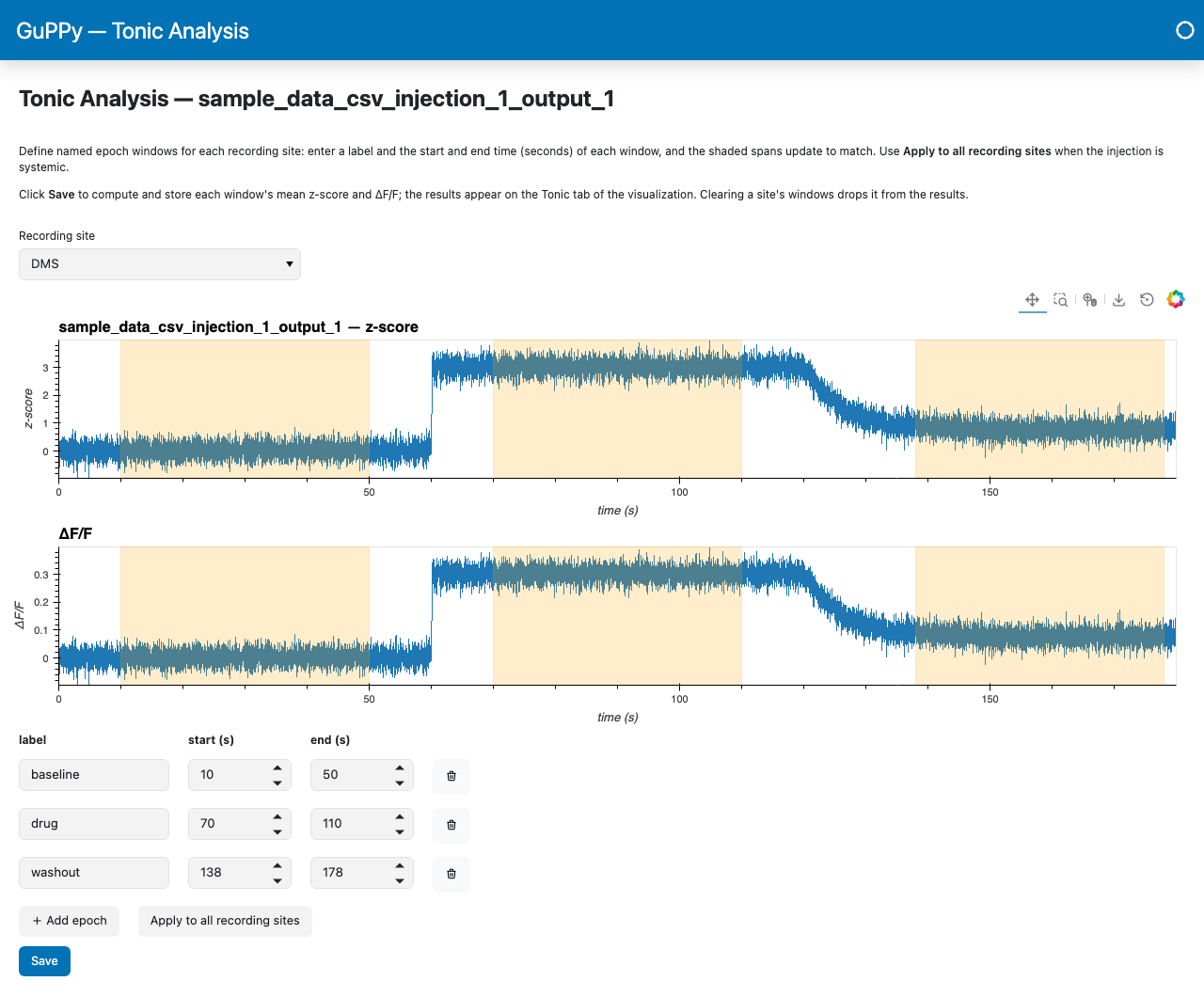
Pick the recording site you want to measure with the Recording site selector.
Click + Add epoch and enter a label for the phase along with its start and end time, in seconds. The shaded spans on the traces update as you type, and the arrow keys nudge a bound by 0.1 s at a time.
Add an epoch for each phase and give each one a distinct label; the trash button on a row deletes it. For a session with an injection at 60 s and the drug clearing from 120 s, three equal windows placed clear of both transitions might read:
label
start (s)
end (s)
baseline10
50
drug70
110
washout138
178
If the manipulation reaches every recording site at the same time, click Apply to all recording sites to copy the current site’s epochs to the others.
Click Save.
The labels you type are the identifiers you see in the results: on the bar chart, in the table, and in the baseline selector.
Choosing epoch bounds#
Each epoch’s value is the plain mean of the samples inside its window, so place the windows over the flat stretches and keep the transitions out. A window that spans a washout ramp averages the ramp.
Windows of equal duration compare most cleanly. They may leave gaps, and they need not cover the whole session.
A window that overhangs the start or end of the recording is accepted and clamped to the samples available. Samples masked as NaN by artifact removal are left out of the mean.
Reading the results#
Run Step 5: Visualization and open the Tonic tab. A run with no saved epochs shows a short note in its place.
Baseline epoch picks which of your epochs the others are measured against.
The two bar panels show each epoch’s change from that baseline, in mean z-score and mean ΔF/F. The baseline epoch sits at zero by definition; the dashed line marks no change, so bars above it rose relative to baseline and bars below it fell.
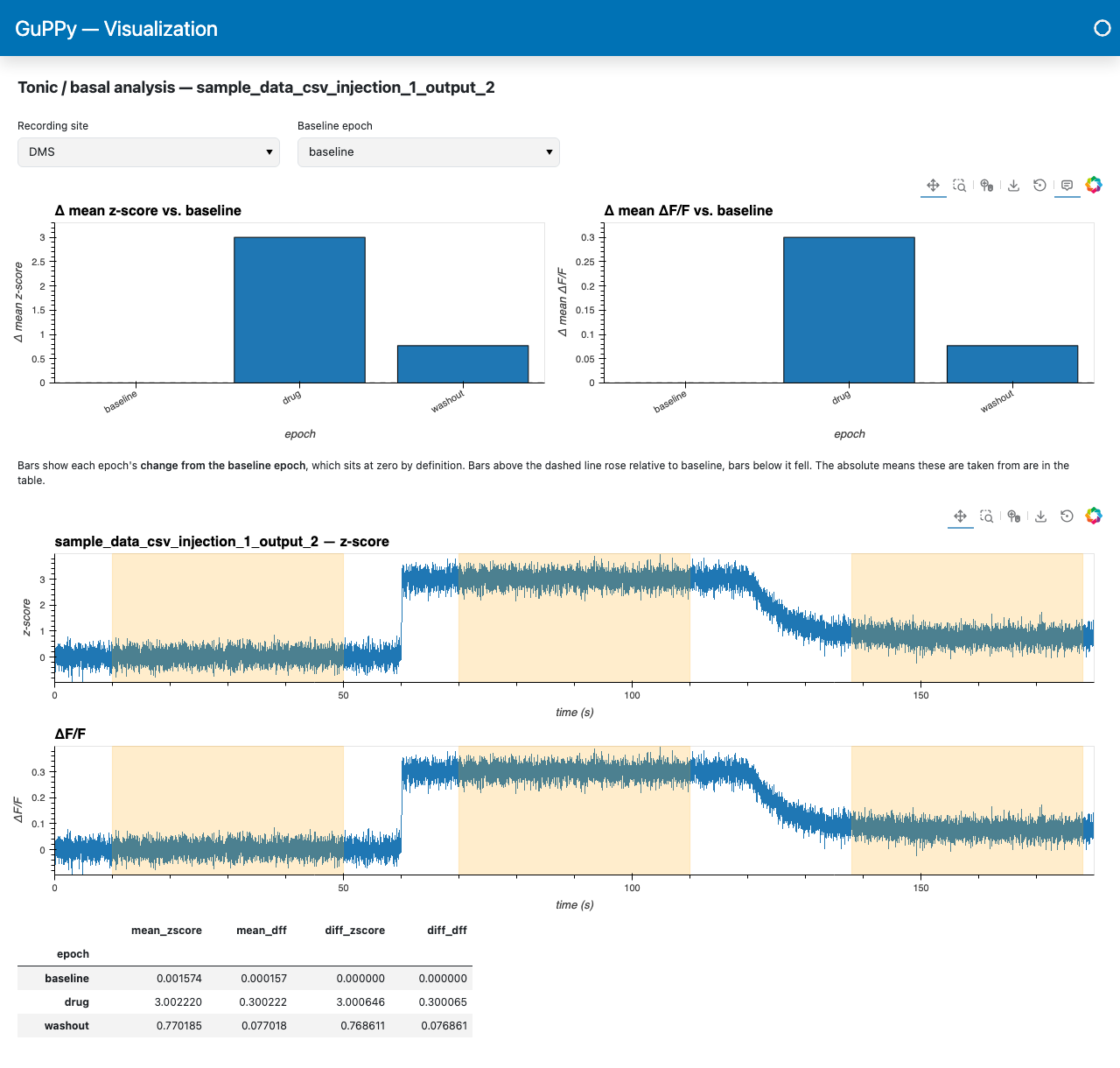
Below the bars, the traces show the analysed windows shaded, and the table gives the
absolute means (mean_zscore, mean_dff) alongside the differences (diff_zscore,
diff_dff).
Changing Baseline epoch re-bases the bars and the two difference columns. The absolute means do not move.
Adjusting the epochs#
Tonic Analysis is re-runnable. Open it again, change the epochs, and save. Clearing a recording site’s rows and saving drops that site from the results.
The means are computed when you save, from the traces the page loaded when it opened. If you re-run Step 3 or Remove Artifacts afterwards, open the page and save again so the stored means match the current traces.
What lands on disk#
Per recording site with at least one epoch window, in the output run folder:
File |
Contents |
|---|---|
|
The epoch windows: |
|
Each epoch’s |
Both are rewritten each time you save. See Output data model for how they sit alongside the rest of a run folder.